
Setting Up Action Control
In this article
Action Control decides which actions a teammate can perform inside the apps they have access to. While Data Access controls what they can view, Action Control governs what they can create, edit, or change. Each row represents one action with a permission level that defines what is allowed. If no custom rows are added, the teammate uses the default action permissions defined on their assigned app. Use Action Control to restrict specific actions from regular cashiers.
Contents
Contents
Add an Action Control Rule
- Click the 👤 Profile icon in the top-right corner.
- Click Teammates.
- On the Teammates page, find the teammate you want to edit.
- Click the ⋯ (three dots) button on the right side of their row.
- Click Edit.
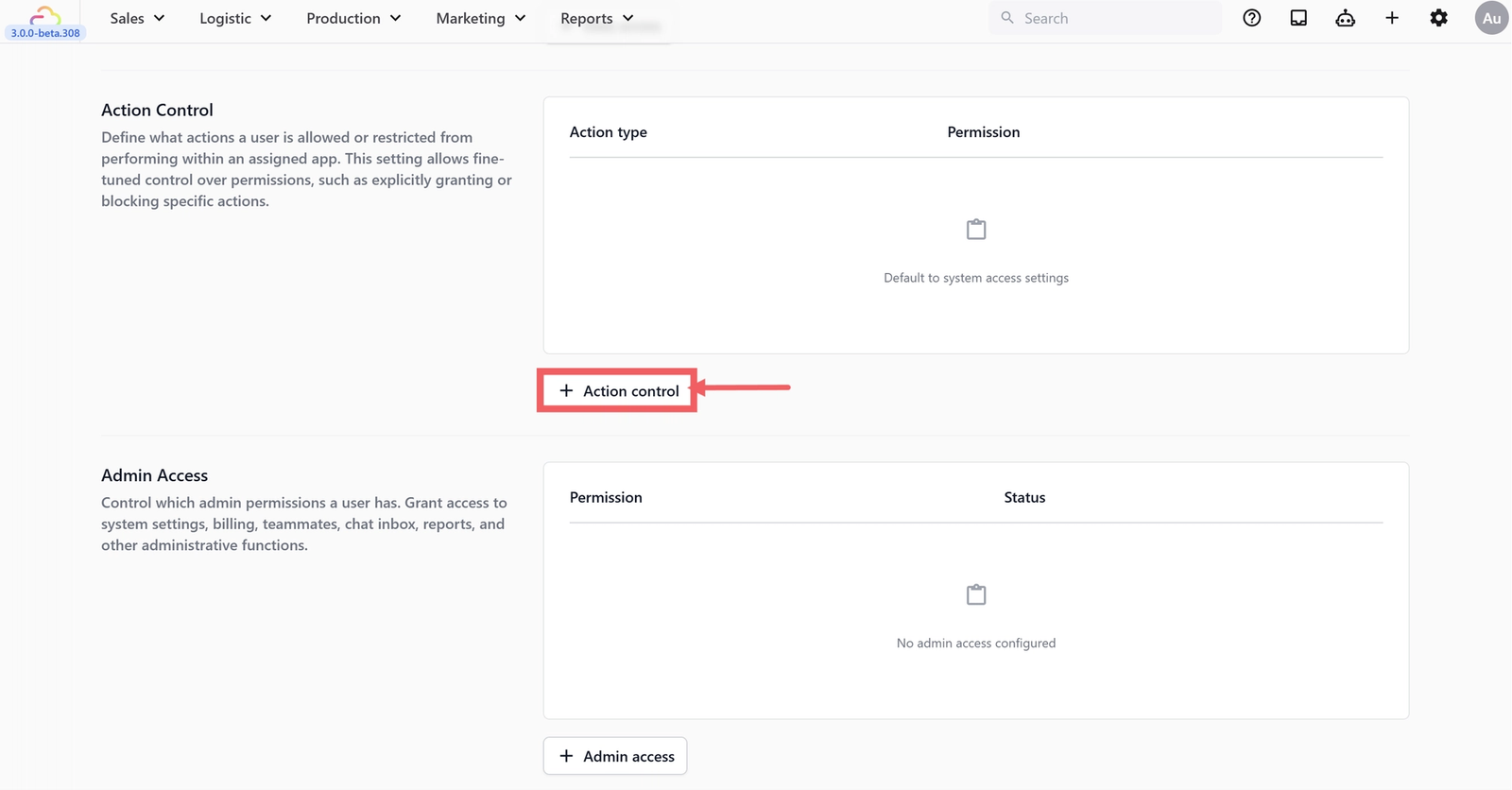
- In the Action Control row, click + Action control.
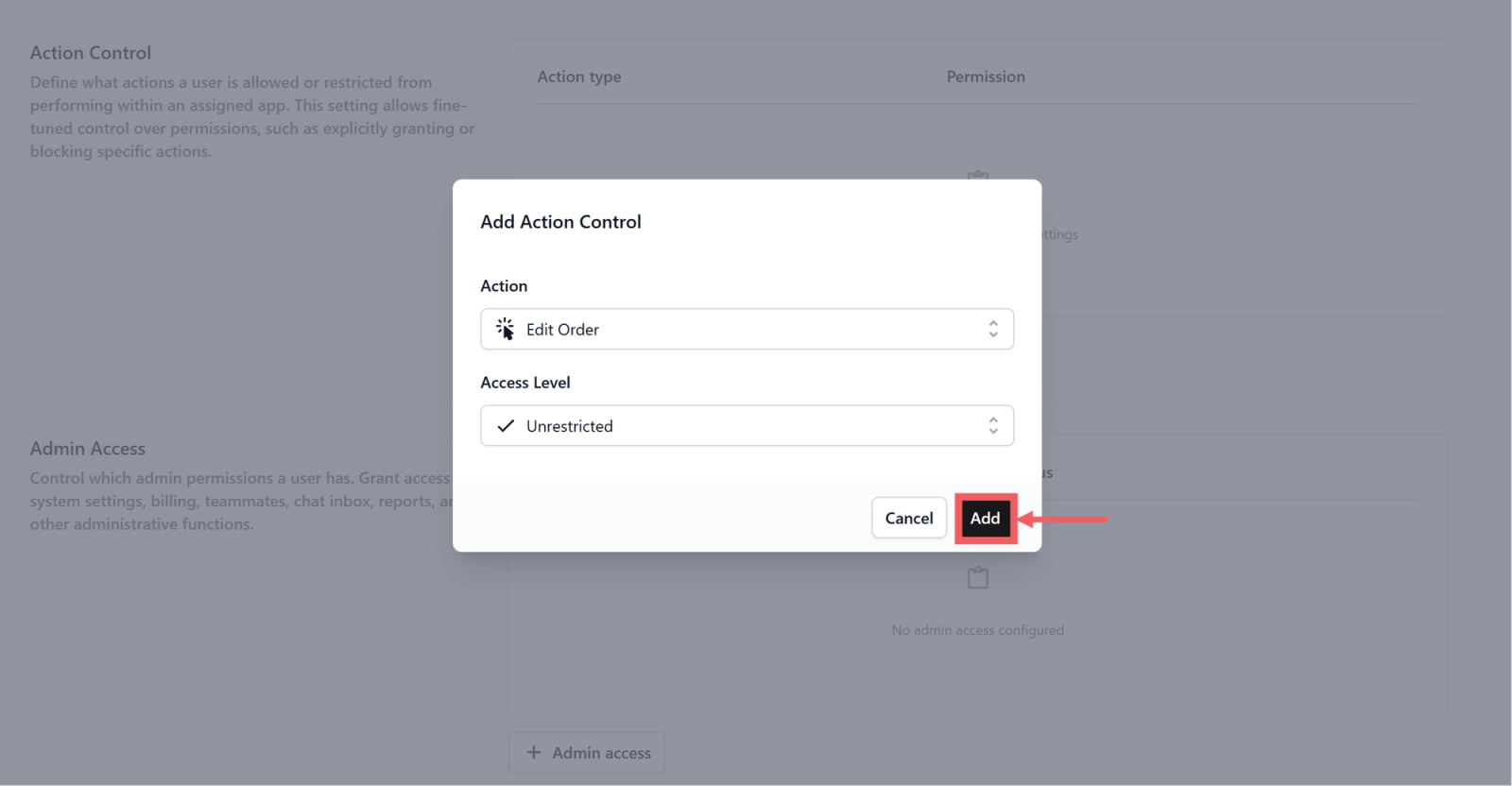
- Pick the action and the access level, then click Add.
Action Types You Can Control
There are seven action types in the dropdown today.
Cancel Order
| Pick this | Result |
|---|---|
| Unrestricted | Teammate can cancel any order |
| Time based access | Teammate can only cancel orders inside the time window you set |
| No access | Teammate cannot cancel any order |
Edit Order
| Pick this | Result |
|---|---|
| Unrestricted | Teammate can edit any order |
| Time based access | Teammate can only edit orders inside the time window you set |
| No access | Teammate cannot edit any order |
Cancel Payment
| Pick this | Result |
|---|---|
| Unrestricted | Teammate can void any payment |
| Time based access | Teammate can only void payments inside the time window you set |
| No access | Teammate cannot void any payment |
Price Overwrites
| Pick this | Result |
|---|---|
| Unrestricted | Teammate can override the price of any item or order |
| No access | Teammate cannot override prices |
Issue Sales Returns
| Pick this | Result |
|---|---|
| Unrestricted | Teammate can issue a return without approval |
| Requires Approval | The return is held for an approver before it processes |
| No access | Teammate cannot issue any return |
Apply Discounts
| Pick this | Result |
|---|---|
| Unrestricted | Teammate can apply any configured discount |
| No access | Teammate cannot apply discounts |
Discharge Items
| Pick this | Result |
|---|---|
| Unrestricted | Teammate can hand items to the customer at any time |
| Paid Only | Teammate can only discharge items if the order is fully paid |
| No access | Teammate cannot discharge items |
For Discharge Items, a separate toggle, Enforce QR code scanning for item discharge, requires the staff to scan the QR code on each item before handing it over.
Dependencies and Notes
- Edit Order and Cancel Order time windows are independent. Setting one does not change the other.
- Issue Sales Returns at Requires Approval routes the return to any teammate who has it set to Unrestricted. Without an approver available, returns stay queued.
- Action Control needs matching Data Access. A teammate cannot edit an order they cannot view.
Recommended Starting Configuration: Counter Staff
A typical counter cashier should take orders and accept payments but not change pricing or cancel anything older than today:
- Apply Discounts: Unrestricted
- Discharge Items: Paid Only, with Enforce QR code scanning on
- Cancel Order: Time based access, Same day only
- Edit Order: Time based access, Same day only
- Cancel Payment: No access
- Price Overwrites: No access
- Issue Sales Returns: Requires Approval
FAQs
A teammate clicks Cancel Order and nothing happens. Why?
Check whether their Cancel Order is set to Time based access and the order is outside the window. They will see the order but the cancel option will be hidden.
Does Apply Discounts let a teammate create new discounts?
No. Creating discount rules is a settings change controlled by Manage Settings. Apply Discounts only lets them use ones you already configured.
Can I require approval for any action other than Sales Returns?
Not in the current UI. Requires Approval is offered only on Issue Sales Returns today.
Does Discharge Items Paid Only stop a partially paid order from going out?
Yes. The teammate sees the items but the discharge button is disabled until the order is fully paid.
A teammate's Edit Order is Same day only but they need to fix a price on yesterday's order. What now?
Either temporarily widen the window to Limit to Past X Days, or have a manager with Unrestricted Edit Order make the fix.
What's Next
Now that write actions are locked down, continue to [Setting Up Admin Access] to decide which admin functions the teammate can use.
Give feedback
Up next
Setting Up Admin AccessDecide whether a teammate can change settings, manage billing, manage other teammates, handle the chat inbox, or run agent tasks.
Read more